Feuerfest

Just the private blog of a Linux sysadmin

Recovering files from anonymous Docker volumes

A while ago I tried to login into my Readeck instance. Only that the login page didn't show up. Instead I was greeted by the "Create your first user" page. I created the same user I had before, with the same password. Thinking that maybe the Docker container got updated and now somehow there was a mismatch between the configured and present users. Or that some configuration variable changed. Or whatever.

I logged in with that new user, only for Readeck to show up empty. No saved articles, no tags, nothing.

Narf! Not fun at all.

What happened?

I did use Watchtower at the time to automatically update all my Docker images. So it was likely that something happened to the volume. As I store all persistent files for containers under /opt/docker for backup purposes, I checked there first. However when I checked /opt/docker/readeck I noticed that the timestamps were odd. I recently added bookmarks to Readeck, but the timestamps were months old.

Was something wrong with the volume? I searched for automatically created volumes containing an db.sqlite3 file, which is the SQLite database for Readeck.

root@dockerhost:~# find /var/lib/docker/volumes/ -type f -name db.sqlite3
/var/lib/docker/volumes/a20f45b8921e1fc4b27a64bffb4882bf2b60cd6a0828dbda94cc7a5042732a05/_data/data/db.sqlite3
/var/lib/docker/volumes/231d86a6aeb573c7d1b69a2f8ae6fb41e3e408f5e4fcb6df50ee655afd354945/_data/data/db.sqlite3
/var/lib/docker/volumes/0a92fa690e2a989987a333e7c942b29f262aab321d7e556e9a1379c98f3c81dd/_data/data/db.sqlite3
/var/lib/docker/volumes/ab3e17ca1bdb9736dc2c13c397568556795a357856db2b75f38d715b322969b0/_data/data/db.sqlite3
/var/lib/docker/volumes/29a674eb2232756fc12eb9a3446ef5160d3a56642f0069e647d2994776f9313a/_data/data/db.sqlite3
/var/lib/docker/volumes/1a51181ea17bf258144232bc9724fe5268febf10753e4b98d3a14df2e7dbf075/_data/data/db.sqlite3
/var/lib/docker/volumes/readeck_readeck-data/_data/data/db.sqlite3
/var/lib/docker/volumes/187d53ec45c6d9bf69f3a5006605a5296dbe855e21846e15c943364db87cf434/_data/data/db.sqlite3

Huh? 7 anonymous and 1 named volume? But that readeck_readeck-data volume shouldn't be there. That's what /opt/docker/readeck is for.. I checked the docker compose file and yep, the volume was still defined there. Along with a totally (syntactically and semantically) wrong path. This lead to Watchtower creating random volumes when the Readeck-container was updated. Looks like I identified the root cause.

Most likely this happened when I edited the standard compose file, but didn't pay enough attention and build this error into it. Then I didn't check immediately after re-deploying the container and left it running for some weeks without using it. *sigh*

Docker, where is my data?

An ls -la on the files showed that all but one file were created around the same time with the same filesize. That one different should have my data, right?

root@dockerhost:~# find /var/lib/docker/volumes/ -type f -name db.sqlite3 -exec ls -la '{}' ';'
-rw-r--r-- 1 root root 3366912 Aug 31  2025 /var/lib/docker/volumes/a20f45b8921e1fc4b27a64bffb4882bf2b60cd6a0828dbda94cc7a5042732a05/_data/data/db.sqlite3
-rw-r--r-- 1 root root 110592 Sep 10  2025 /var/lib/docker/volumes/231d86a6aeb573c7d1b69a2f8ae6fb41e3e408f5e4fcb6df50ee655afd354945/_data/data/db.sqlite3
-rw-r--r-- 1 root root 110592 Sep 10  2025 /var/lib/docker/volumes/0a92fa690e2a989987a333e7c942b29f262aab321d7e556e9a1379c98f3c81dd/_data/data/db.sqlite3
-rw-r--r-- 1 root root 110592 Sep 10  2025 /var/lib/docker/volumes/ab3e17ca1bdb9736dc2c13c397568556795a357856db2b75f38d715b322969b0/_data/data/db.sqlite3
-rw-r--r-- 1 root root 110592 Sep  2  2025 /var/lib/docker/volumes/29a674eb2232756fc12eb9a3446ef5160d3a56642f0069e647d2994776f9313a/_data/data/db.sqlite3
-rw-r--r-- 1 root root 110592 Sep 10  2025 /var/lib/docker/volumes/1a51181ea17bf258144232bc9724fe5268febf10753e4b98d3a14df2e7dbf075/_data/data/db.sqlite3
-rw-r--r-- 1 root root 110592 Sep 10  2025 /var/lib/docker/volumes/readeck_readeck-data/_data/data/db.sqlite3
-rw-r--r-- 1 root root 110592 Sep 10  2025 /var/lib/docker/volumes/187d53ec45c6d9bf69f3a5006605a5296dbe855e21846e15c943364db87cf434/_data/data/db.sqlite3

I verified that this volume is indeed belonging to Readeck by printing the config.toml as only the Readeck container uses port 7777. After all db.sqlite3 is a pretty common name.

root@dockerhost:~# cat /var/lib/docker/volumes/a20f45b8921e1fc4b27a64bffb4882bf2b60cd6a0828dbda94cc7a5042732a05/_data/config.toml

[main]
log_level = "INFO"
secret_key = "REMOVED"
data_directory = "data"

[server]
host = "0.0.0.0"
port = 7777

[database]
source = "sqlite3:data/db.sqlite3"

I wanted to understand exactly what happened. So I used the following command to print out all used volume mounts inside the readeck container, with their source (local path on dockerhost) and destination (where they got mounted inside the container).

It looked the following:

root@dockerhost:~# docker container inspect readeck | jq -r '.[].Mounts[] | "\(.Source) -> \(.Destination)"'
/var/lib/docker/volumes/readeck_readeck-data/_data -> /opt/readeck
/var/lib/docker/volumes/ab3e17ca1bdb9736dc2c13c397568556795a357856db2b75f38d715b322969b0/_data -> /readeck

So anonymous volume ab3e17ca1bdb9736dc2c13c397568556795a357856db2b75f38d715b322969b0 is the currently used one and got mounted under /readeck, where /readeck is the normal path for mounting. The named volume readeck-data was mounted under /opt/readeck. Yep, I messed up completely when writting that compose file.. Even wrote /opt/docker/readeck wrong and messed up the sides of the parameter. 😅

The anonymous volume with my data a20f45b8921e1fc4b27a64bffb4882bf2b60cd6a0828dbda94cc7a5042732a05 wasn't mounted at all. No wonder my data was missing.

The solution was easy, I zipped everything under /opt/docker/readeck prior deletion, just to be safe. Then I copied everything from /var/lib/docker/volumes/a20f45b8921e1fc4b27a64bffb4882bf2b60cd6a0828dbda94cc7a5042732a05 to /opt/docker/readeck and adjusted the file ownerships.

root@dockerhost:~# cp -ar /var/lib/docker/volumes/a20f45b8921e1fc4b27a64bffb4882bf2b60cd6a0828dbda94cc7a5042732a05/* /opt/docker/readeck
root@dockerhost:~# chown readeck:readeck /opt/docker/readeck -R

After that I fixed the compose file, deleting the named volume part and correcting the mount parts for my /opt/docker/readeck volume.

---
services:
  app:
    image: codeberg.org/readeck/readeck:latest
    container_name: readeck
    ports:
      - 7777:7777
    environment:
      # Defines the application log level. Can be error, warn, info, debug.
      - READECK_LOG_LEVEL=info
      # The IP address on which Readeck listens.
      - READECK_SERVER_HOST=0.0.0.0
      # The TCP port on which Readeck listens. Update container port above to match (right of colon).
      - READECK_SERVER_PORT=7777
      # Optional, the URL prefix of Readeck.
      # - READECK_SERVER_PREFIX=/
      # Optional, a list of hostnames allowed in HTTP requests.
      # - READECK_ALLOWED_HOSTS=readeck.example.com
    volumes:
      # Example with named volume under /var/lib/docker/volumes/:
      #  - readeck-data:/readeck
      # Volume under /opt/docker/readeck
      - /opt/docker/readeck/:/readeck
    restart: unless-stopped
    healthcheck:
      test: ["CMD", "/bin/readeck", "healthcheck", "-config", "config.toml"]
      interval: 30s
      timeout: 2s
      retries: 3

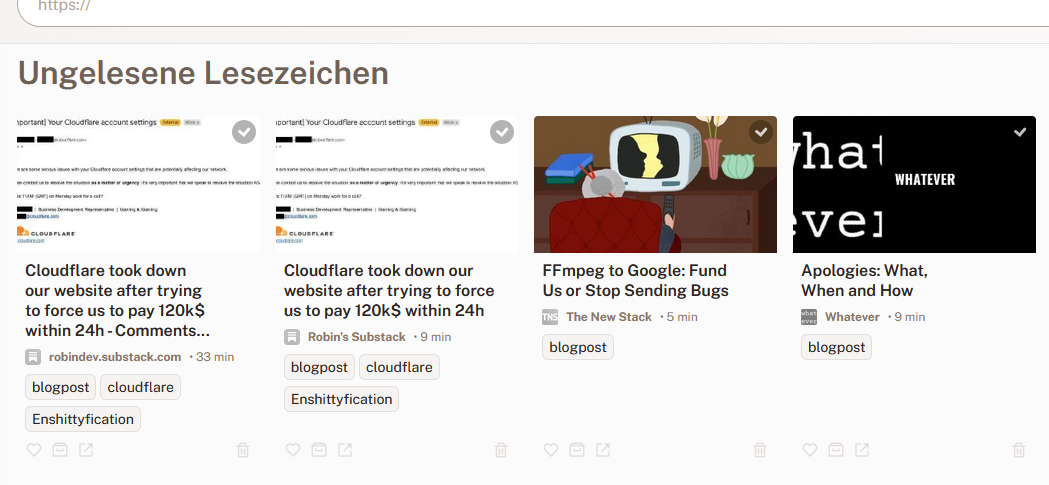
A container restart and Yai! all my data is back.
Screenshot of my Readeck instance with data(Click to enlarge)

I additionally verified this by looking at the mounted volume again:

root@dockerhost:~# docker container inspect readeck | jq -r '.[].Mounts[] | "\(.Source) -> \(.Destination)"'
/opt/docker/readeck -> /readeck

This looks fine!

Cleaning up

What's left? Obviously some volumes we don't need anymore which didn't get automatically deleted when the container was re-deployed. This is due to the fact that almost all volumes are created via a Docker compose file. And when a volume (even anonymous ones) are created via docker compose it automatically adds labels to the volume.

The catch? According to the documentation a docker volume prune should delete all anonymous volumes, right?

It doesn't. As this deletes far too less volumes.

root@dockerhost:~# docker volume prune
WARNING! This will remove anonymous local volumes not used by at least one container.
Are you sure you want to continue? [y/N] y
Deleted Volumes:
0ffc2596aab0b5d7f55081cfcd82c04cb06f3048fcb98b1eae2a84030204fe71
b2309b6bd7409528a863cc1ac50ac30b70fcdccfa511e7c0b321660955fd7743
eb87c77fde8b4af28c2e20a97da4c4ca96366ae13b24f8808d76927206722a20
3631579e7175830579763bc090a6e3447ff2a2b3b3fe837df40665d8549aee93
9e95bb31bafe0c5fd671c1da565306863d610e6155e1652e29e5921a49bc3a1c
80803ccaf0832c7a224e457edf3b0ba3e22179b0be06e2e3e00be7e52559b26d
3595952fe6af563d3afa6f7d56fe3bf0b7dfe8d008e1bb148fade0207a1f319a
585cee8e70d51d051049e4734e8a45d028a2020cf76e6605e33f6a4b68e9f5cd

Total reclaimed space: 0B


Well, the thing is: Volumes with labels are NOT treated as anonymous volumes by docker volume prune. Even if their names imply otherwise. The labels com.docker.compose.project, com.docker.compose.version and com.docker.compose.volume are added automatically.

root@portainer:/var/lib/docker/volumes# docker volume inspect firefly-iii_firefly_iii_upload
[
    {
        "CreatedAt": "2025-08-14T18:29:37+02:00",
        "Driver": "local",
        "Labels": {
            "com.docker.compose.project": "firefly-iii",
            "com.docker.compose.version": "",
            "com.docker.compose.volume": "firefly_iii_upload"
        },
        "Mountpoint": "/var/lib/docker/volumes/firefly-iii_firefly_iii_upload/_data",
        "Name": "firefly-iii_firefly_iii_upload",
        "Options": null,
        "Scope": "local"
    }
]

Hence we need to add -a or --all in order to delete unused, anonymous volumes with labels too.

root@dockerhost:~# docker volume prune -a
WARNING! This will remove all local volumes not used by at least one container.
Are you sure you want to continue? [y/N] y
Deleted Volumes:
b902bad86954afb635992b32c4f382f08d4183c8ef9ce27ddbac03731e0405fe
0f16bb90cfb343b78fcbc7c8deec1cd2de3ee6e68f949b2b2bdc53ed3a7066e9
187d53ec45c6d9bf69f3a5006605a5296dbe855e21846e15c943364db87cf434
231d86a6aeb573c7d1b69a2f8ae6fb41e3e408f5e4fcb6df50ee655afd354945
818bd6aeaf630f00565d4ab56cdefffd6e68e42b8a75250d0573ba2f30cc5f30
939b33eb1a0ff229a1b69da08471c9fd4958d46544ddaeceaf6c81dd4d467619
362344bb946409778ae17f586bd94ac3468057a83ea15fd5d664fe820b6987bb
0b75f0001bc41866736fca25052fb7de92ac12bb9a836cdc6b30dd0cfed30bdf
93fc5df32a27ded4dc82fa90c8d0158ebf31149c7f3c2be2a99641b2eb7d3a57
d55795ba82c823b2f56d0ece2b26ab8f441df58707ca2f9f5dff9636ec3fccfd
0de81441bf39b5df40e022297d124fb8895d4a9b0b0488134820f33d03d12060
1a51181ea17bf258144232bc9724fe5268febf10753e4b98d3a14df2e7dbf075
1f123a21114fa7b43b75fdbcf03e55ecc0852a013d1e3b8db9c9321cc8b14a36
29a674eb2232756fc12eb9a3446ef5160d3a56642f0069e647d2994776f9313a
38252cf2f07379d3af44cbe8f9694b20083cd804312816357fc0b188455fa295
7f0a2646cde46c3aca1affe7c145130129027825437472b12926287f3a641301
ab3e17ca1bdb9736dc2c13c397568556795a357856db2b75f38d715b322969b0
b4f8a04c56d6f222691d73e057153f7e8b45bd47d2b7956b9623dd04c33e33dc
readeck_readeck-data
a20f45b8921e1fc4b27a64bffb4882bf2b60cd6a0828dbda94cc7a5042732a05
0a92fa690e2a989987a333e7c942b29f262aab321d7e556e9a1379c98f3c81dd
67c4199a258f16362cc456003ea269a6e5bfb51fa2354665766e62ca93616487
85f7700515ede9dabeeaf4edd64509dbfed8988a14b37cf62d6d923934a6f8db

Total reclaimed space: 2.433GB

The Labels also explain why there were so many unused anonymous volumes. As apparently neither Watchtower nor Portainer seem to use docker volume prune -a when doing their maintenance chores. Which is a decision I can understand, but find annoying anyway.

Dockers stance is: Named volumes must be deleted manually (or by using -a/--all), as they have been named for a reason and, most likely, contain data which is persistent and therefore important. Same for volumes with labels.

Something I always forget

Let's say we want to execute a command for every container we have. For this we need the container name, or ID - but the names are easier to use for us humans and make more sense in outputs, etc. Also the IDs will change after certain operations. Making it impossible to trace back what action had been done to which container.

Getting the containers names should be easy with awk, right? Well, no. Sadly docker container ls doesn't use tabs or the like which we could easily use as the field separator for awk. Hence something like docker container ls | awk -F'\t' '{print $7}' doesn't work and won't print out any information at all.

The IDs are easily retrievable with: docker container ls | awk '{print $1}' | tail -n +2

Luckily Docker supports the --format parameter for most of its commands. This takes simple Go templates and we can use JSON syntax in there.

Knowing this, we can retrieve all container names easily via the following command:

root@dockerhost:~# docker container ls --format "{{.Names}}"
n8n
metube
stirling-pdf
termix
homepage
readeck
nebula-sync
[...]
Comments

MeTube: A selfhosted WebUI for yt-dlp

Most people should have heard of youtube-dl and the legal battles around it. As the content industry only saw it as a tool for piracy. And yes, while many may use it solely for that there is also the big group of people who want to download single TV news articles (videos) or documentaries produced by public-service broadcasting companies such as ARTE, ARD, ZDF - to name a few German ones. youtube-dl was sued into oblivion, but as it was OpenSource other forks were created with yt-dlp being the currently active one.

yt-dlp however is not just the only program offering this kind of functionality. As such there is the program MediathekView which gathers all senders program information and allows for the easy download of all content. Why MediathekView isn't sued? It only allows the download of content from the online Mediathek of public broadcasting companies, such as: ARD, ZDF, Arte, 3Sat, SWR, BR, MDR, NDR, WDR, HR, RBB, ORF and SRF. Which are all public broadcasting TV senders from Germany, Austria and Switzerland. Hence no problems with 3rd party rights do exist.

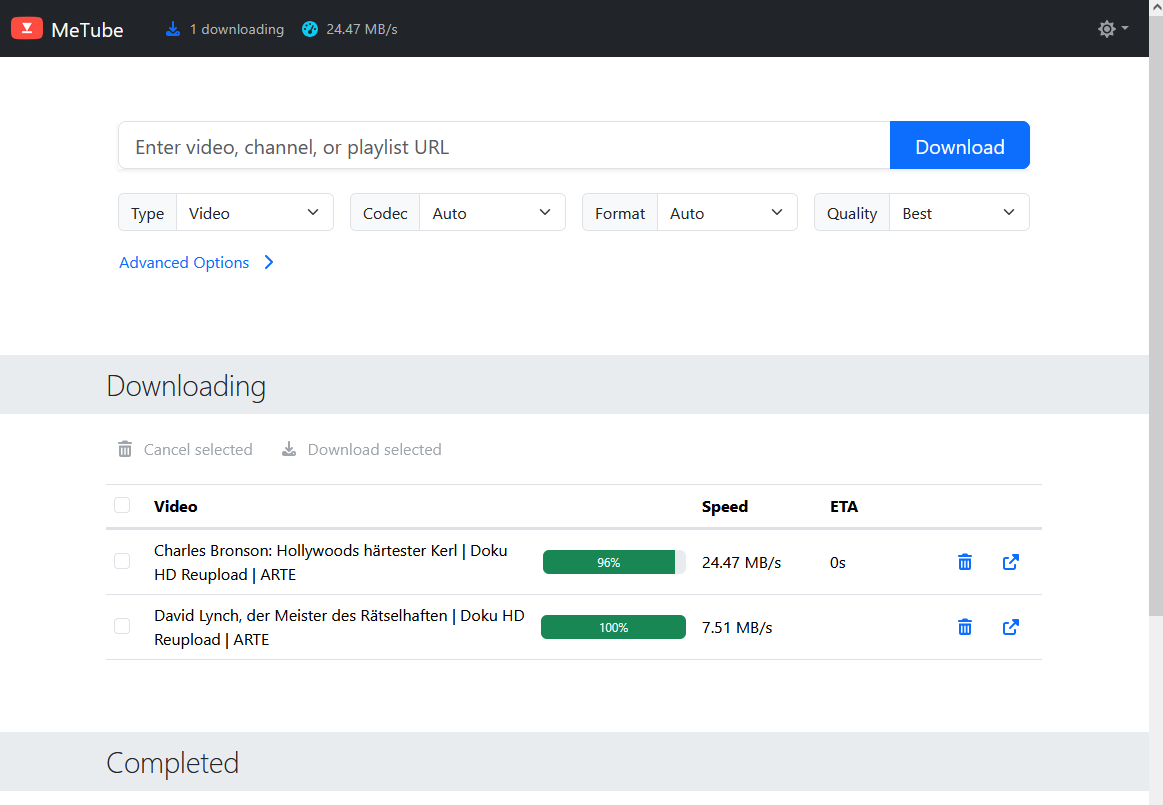
But... MediathekView is a local application and I like to have a simple web-frontend useable from any device. Introducing MeTube it's a web-frontend build around yt-dlp and provided as a Docker container. The WebUI itself is minimalistic but does its job.

Screenshot from the Metube WebUI(Click to enlarge)

In my environment MeTube is configured to save videos on a share on my NAS. Storing the videos in the correct folder automatically.

Mounting the CIFS-Share is done via the following line in /etc/fstab:

root@portainer:~# cat /etc/fstab
# /etc/fstab: static file system information.
[...]
# Metube Mount
//ip.ip.ip.ip/video/yt-dlp /mnt/yt-dlp cifs rw,vers=3.0,credentials=/root/.fileserver_smbcredentials,dir_mode=0775,file_mode=0775,uid=1002,gid=1002

Then we use that local mount for the /downloads folder of the Docker container. After the first start I learned I additionally need to explicitly store the TEMP_DIR and STATE_DIR on local volumes on the Docker container host itself. After that I fixed the healthcheck as it is hardcoded for HTTP.

services:
  metube:
    image: ghcr.io/alexta69/metube
    container_name: metube
    restart: unless-stopped
    ports:
      - "8081:8081"
    volumes:
      # On CIFS-Share, mounted via /etc/fstab
      - /mnt/yt-dlp:/downloads
      # HTTPS
      - /opt/docker/certs/portainer.lan.crt:/ssl/crt.pem
      - /opt/docker/certs/portainer.lan.key:/ssl/key.pem
      # Local volumes to make CIFS-Share work
      - /opt/docker/metube/temp:/temporary
      - /opt/docker/metube/state:/state
    environment:
      - PUID=1002
      - PGID=1002
      # HTTPS
      - HTTPS=true
      - CERTFILE=/ssl/crt.pem
      - KEYFILE=/ssl/key.pem
      # Needed as our /downloads folder is located on a CIFS-Share
      - TEMP_DIR=/temporary
      - STATE_DIR=/state
      # Downloaded files are deleted on the server, when they are trashed from the "Completed" section of the UI
      #  - Will delete files from /download! This is not to clear some kind of cache
      #- DELETE_FILE_ON_TRASHCAN=true
      #
      # yt-dlp options
      # Download best video (not higher than 1080p) & audio in german language, if no german is available use english, else use default
      # Note 1: Not every language has a separate "audio only" track, this is why we use best[language...], as ba[language=...] only matches "audio only" tracks
      # Note 2: yt-dlp can't reliably identify the automatically generated audiotracks as these are not clearly listed as such in the metadata
      #   format-sort res:1080 means: Not higher than 1080p
      #   ^=de means we also take de-DE or de-AT, similiar for ^=en meaning en-UK, en-US, etc.
      - 'YTDL_OPTIONS={ "format-sort": "res:1080", "format": "best[language^=de]/best[language^=en]/b", "merge_output_format": "mp4" }'
    # Internal container healthcheck is hardcoded for HTTP
    healthcheck:
        test: ["CMD-SHELL", "curl -fsS --insecure -m 2 https://localhost:8081/ || exit 1"]
        interval: 60s
        timeout: 10s
        retries: 3
        start_period: 10s

The only feature I currently miss is that I can't select the audio track which I do want to download along with the video. However having such options would only solve one part of the problem. As the other part would be that each site would need to clearly state which audio track contains which language. And that isn't even reliably done on YouTube.

Hence I help myself with passing some options to yt-dlp via YTDL_OPTIONS. My config 'YTDL_OPTIONS={ "format-sort": "res:1080", "format": "best[language^=de]/best[language^=en]/b", "merge_output_format": "mp4" }' means: Sort the videos based on the resolution, set 1080p as the highest (best). Videos in higher resolution won't be considered for download. Based on that we download the best video/audio available in German and if nothing is available in German we use English. If that isn't available too, we just use the default.

As stated in the comments of the Dockerfile the problem is that not every language has an audio only track. Only on those a bestaudio filter like ba[language^=en] would work. I encountered too many videos where the language was part of the video track, therefore I switched to just use best[language^=...]. This works more reliable from my experience. And yes, these settings overwrite everything you select in the web-frontend.

Nonetheless for the edge cases being able to define settings for a single download would be nice.

Last tips

If you encounter any problem when downloading a video with yt-dlp make sure you have a JavaScript runtime installed (MeTube uses deno). You either need to specify the path to it in the config file or on the command line via: yt-dlp --js-runtimes deno:/path/to/deno -F URL as only then a -F will show you all available formats. Else some can be missing.

Secondly, use -s to simulate a run when testing your config. Like for my config above: yt-dlp --js-runtimes deno:/path/to/deno -s -S res:1080 -f "best[language^=de]/best[language^=en]/b" URL

Also pay attention to the log line that stated which video and audio track are being downloaded: [info] YouTube-VideoID: Downloading 1 format(s): 96-5. This number corresponds directly to the values you can retrieve with -F. Generally when your filter isn't working it mostly downloads the default video and audio track.

Generally I can recommend reading the yt-dlp readme on Format Selection.

Comments

Termix: SelfHosted connection manager

I finally got around setting myself up with a Termix instance (their GitHub). Its a connection manager for various protocols (SSH, RDP, Telnet, etc.) accessible via a web-frontend. Termix it self runs inside a Docker container.

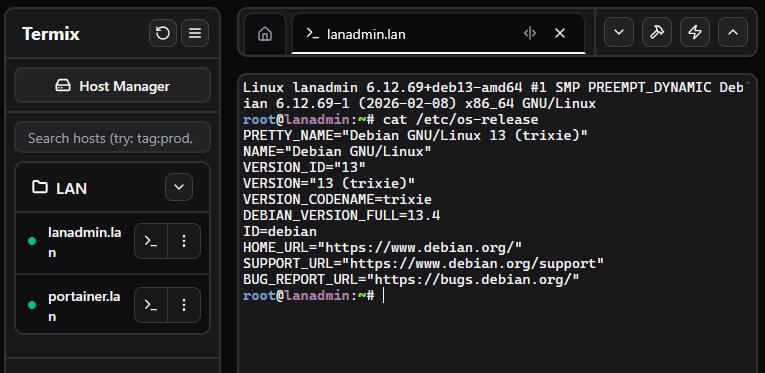
Here is a view of the web-frontend (I resized the window to make it smaller). I generated a new SSH-Key solely for the use connecting from Termix to the configured hosts. Then added the public key to 2 hosts, put them inside a folder for better overview, hit connect and it works.

Screenshot of the Termix WebUI(Click to enlarge)

It supports the creation of tunnels too and various other options. So far I have only used it with SSH so I can't say much regarding RDP (or Telnet 😂). Having this reachable via HTTPS could be a nice solution in environments where direct SSH (and VPN) is blocked.

The docker compose file

I configured SSL with certificates from my own CA. These are mounted read-only into the container under /certs. This all works without Traefik, Caddy or Nginx for SSL.

services:
  termix:
    image: ghcr.io/lukegus/termix:latest
    container_name: termix
    restart: unless-stopped
    environment:
      - ENABLE_SSL=true
      - SSL_PORT=8443
      - SSL_DOMAIN=host.tld
      - PORT=8080
      - SSL_CERT_PATH=/certs/host.tld.crt
      - SSL_KEY_PATH=/certs/host.tld.key
    ports:
      - "6666:8443"
    volumes:
      - /opt/docker/termix/data:/app/data
      # Mount cert-dir for certificates read-only
      - /opt/docker/certs/:/certs:ro

A welcomed surprise

I was pleasantly surprised to notice that the Termix docker container automatically reported "Healthy" inside my dashboard. Without me ever having defined a proper healthcheck.

Turns out Termix is one of these rare projects who define a healthcheck in the container image itself:

root@host:~# docker inspect termix | grep -A 20 Healthcheck
            "Healthcheck": {
                "Test": [
                    "CMD-SHELL",
                    "wget -q -O /dev/null http://localhost:30001/health || exit 1"
                ],
                "Interval": 30000000000,
                "Timeout": 10000000000,
                "StartPeriod": 60000000000,
                "Retries": 3
            },

Nice!

Comments

Goodbye, Bludit? Hello, Kirby?

For a few months now, I've been regularly coming back to this point where I ask myself whether I want to continue using Bludit. The latest version dates from August 2024, and there are issues with IT security-related bugs open and unresolved on GitHub.

Sure, Bludit is open source. Anyone can fork it. But Jürgen Greuter (alias: Tante) wrote back in 2013: "Host your own is cynical". In this text, he discusses why not everyone can set up and operate software "just like that" when a service is discontinued or its business model changes fundamentally.

And in this sense, I would like to note: "Fork your own is cynical"

I want to blog. I want to write down and publish my thoughts. I don't want to programme PHP or deal with problems in dozens of different browser versions. In some cases, I would also have to acquire a lot of knowledge (again) first. And the time spent for maintaining the fork? No, thank you.

I just want to be a user. Period.

And well, as can be read in the Bludit forum, the only developer (Diego) is not working on Bludit until further notice. There are apparently only minimal adjustments. Too bad. Also because security-related bugs are obviously not included.

But just as I simply want to be a user, I can understand that Diego also has a life and needs to pay his bills.

So I did a little research and came across the blogging software Kirby. Also a FlatFile CMS. You do have to buy a licence for Kirby, but at 99€ for three years, it's more than fair. And the source code is available on GitHub. So if I want to, I can dig through the code myself and see what's going on or whether there's already an issue for my problem.

What's more, the software has been on the market for over 10 years and is used by several well-known magazines and projects (e.g. OBS and Katapult Magazine). That also speaks for its reliability.

Well, I think I'll spend a weekend or so with the trial version and see how Kirby feels. The demo was nice, anyway, and didn't leave me wanting anything.

Comments

Opinion: fail2ban doesn't increase system security, it's just a mere logfile cleanup tool

Like many IT people, I pay to have my own server for personal projects and self-hosting. As such, I am responsible for securing these systems as they are, of course, connected to the internet and provide services to everyone. Like this blog for example. So I often read about people installing Fail2Ban to "increase the security of their systems".

And every time I read this, I am like this popular meme from the TV series Firefly:

As I don't share this view of Fail2Ban - in fact, I'm against the view that it improves security - but I'll keep quiet, knowing that starting this discussion is simply not helpful. Nor that it is wanted.

For me, Fail2Ban is just a log cleanup tool. Its only benefit is that it will catch repeated login attempts and deny them by adding firewall rules to iptables/nftables to block traffic from the offending IPs. This prevents hundreds or thousands of extra logfile lines about unsuccessful login attempts. So it doesn't improve the security of a system, as it doesn't prevent unauthorised access or strengthen authorisation or authentication methods. No, Fail2Ban - by design - can only act when an IP has been seen enough times to trigger an action from Fail2Ban.

With enough luck on the part of the attacker - or negligence on the part of the operator - a login will still succeed. Fail2Ban won't save you if you allow root to login via SSH with the password "root" or "admin" or "toor".

Granted, even Fail2Ban knows this and they write this prominently on their project's GitHub page:

Though Fail2Ban is able to reduce the rate of incorrect authentication attempts, it cannot eliminate the risk presented by weak authentication. Set up services to use only two factor, or public/private authentication mechanisms if you really want to protect services.

Source: https://github.com/fail2ban/fail2ban

Yet, the number of people I see installing Fail2Ban to "improve SSH security" but refusing to use public/private key authentication is staggering.

I only allow public/private key login for select non-root users specified via AllowUsers. Absolutely no password logins allowed. I've changed the SSH port away from port 22/tcp and I don't run Fail2Ban. As with this setup, there are not that many login attempts anyway. And those that do tend to abort pretty early on when they realise that password authentication is disabled.

Although in all honesty: Thanks to services like https://www.shodan.io/ and others finding out the changed SSH port is not a problem. There are dozens of tools that can detect what is running behind a port and act accordingly. Therefore I do see my fair share of SSH bruteforce attempts. Denying password authentication is the real game changer.

So do yourself a favour: Don't rely on Fail2Ban for SSH security. Rely on the following points instead:

  • Keep your system up to date! As this will also remove outdated/broken ciphers and add support for new, more secure ones. All the added & improved SSH security gives you nothing if an attacker can gain root privileges via another vulnerability.
  • AllowUsers or AllowGroups: To only specified users to login in via SSH. This is generally preferred over using DenyUsers or DenyGroups as it's generally wiser to specify "what is allowed" as to specify "what is forbidden". As the bad guys are pretty damn good in finding the flaws and holes in the later one.
  • DenyUsers or DenyGroups: Based on your groups this may be useful too but I try to avoid using this.
  • AuthorizedKeysFile /etc/ssh/authorized_keys/%u: This will place the authorized_keys file for each user in the /etc/ssh/authorized_keys/ directory. This ensures users can't add public keys by themselves. Only root can.
  • PermitEmptyPasswords no: Should be self-explaining. Is already a default.
  • PasswordAuthentication no and PubkeyAuthentication yes: Disables authentication via password. Enabled authentication via public/private keys.
  • AuthenticationMethods publickey: To only offer publickey authentication. Normally there is publickey,password or the like.
  • PermitRootLogin no: Create a non-root account and use su. Or install sudo and use that if needed. See also AllowUsers.
Comments

gethomepage 1.0 release and new security parameter introduced

gethomepage.dev: https://gethomepage.dev/assets/homepage_demo_clip.webp

homepage (GitHub) - the dashboard I use to keep an overview of all the services I run in my LAN released their 1.0 version yesterday on March 14th 2025.

With that they introduced a new parameter to limit which hosts can show the dashboard. I haven't yet read about why this was introduced, but it's fixed quickly.

As Watchtower does all the maintenance work for the containers running on my installation of Portainer I was already greeted with the following error message:

In the logfile for the container running homepage I saw the following error:

[2025-03-15T16:54:13.497Z] error: Host validation failed for: portainer.lan:3000. Hint: Set the HOMEPAGE_ALLOWED_HOSTS environment variable to allow requests from this host / port.

As I don't use a separate IP or hostname for the dashboard and just forward the port 3000/tcp towards the homepage-container I access it using the hostname of my Portainer host. Therefore this message makes sense.

Luckily the documentation for the newly required environment variable is already on their homepage: https://gethomepage.dev/installation/#homepage_allowed_hosts

Armed with this knowledge we can change the stack file (Portainers term for a docker-compose file - not to be confused with the docker swarm command docker stack) and introduce the HOMEPAGE_ALLOWED_HOSTS parameter. I added the IP-address too, in case the DNS servers in my LAN should stop working.

services:
  homepage:
    image: ghcr.io/gethomepage/homepage:latest
    container_name: homepage
    ports:
      - 3000:3000
    environment:
      HOMEPAGE_ALLOWED_HOSTS: 192.168.178.21:3000,portainer.lan:3000
    volumes:
      - /opt/docker/homepage.dev/config:/app/config # Make sure your local config directory exists
      - /var/run/docker.sock:/var/run/docker.sock # (optional) For docker integrations
      - /opt/docker/homepage.dev/icons:/app/public/icons # icons, reference as /icons/picture.png in YAML

After that just hit the "Update the stack" button and it's working again.

Comments