Termix: SelfHosted connection manager
I finally got around setting myself up with a Termix instance (their GitHub). Its a connection manager for various protocols (SSH, RDP, Telnet, etc.) accessible via a web-frontend. Termix it self runs inside a Docker container.
Here is a view of the web-frontend (I resized the window to make it smaller). I generated a new SSH-Key solely for the use connecting from Termix to the configured hosts. Then added the public key to 2 hosts, put them inside a folder for better overview, hit connect and it works.
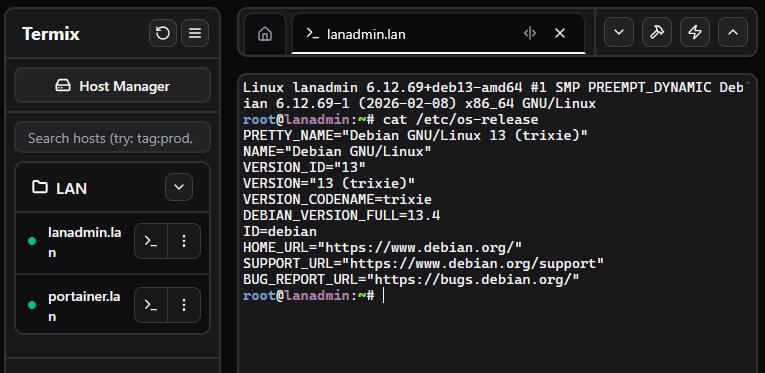 (Click to enlarge)
It supports the creation of tunnels too and various other options. So far I have only used it with SSH so I can't say much regarding RDP (or Telnet 😂). Having this reachable via HTTPS could be a nice solution in environments where direct SSH (and VPN) is blocked.
The docker compose file
I configured SSL with certificates from my own CA. These are mounted read-only into the container under /certs. This all works without Traefik, Caddy or Nginx for SSL.
services:
  termix:
    image: ghcr.io/lukegus/termix:latest
    container_name: termix
    restart: unless-stopped
    environment:
      - ENABLE_SSL=true
      - SSL_PORT=8443
      - SSL_DOMAIN=host.tld
      - PORT=8080
      - SSL_CERT_PATH=/certs/host.tld.crt
      - SSL_KEY_PATH=/certs/host.tld.key
    ports:
      - "6666:8443"
    volumes:
      - /opt/docker/termix/data:/app/data
      # Mount cert-dir for certificates read-only
      - /opt/docker/certs/:/certs:ro
A welcomed surprise
I was pleasantly surprised to notice that the Termix docker container automatically reported "Healthy" inside my dashboard. Without me ever having defined a proper healthcheck.
Turns out Termix is one of these rare projects who define a healthcheck in the container image itself:
root@host:~# docker inspect termix | grep -A 20 Healthcheck
            "Healthcheck": {
                "Test": [
                    "CMD-SHELL",
                    "wget -q -O /dev/null http://localhost:30001/health || exit 1"
                ],
                "Interval": 30000000000,
                "Timeout": 10000000000,
                "StartPeriod": 60000000000,
                "Retries": 3
            },
Nice!