Feuerfest

Just the private blog of a Linux sysadmin

TinyMCE: Configure iframe sandboxing to allow YouTube domains

In TinyMCE 6.8.1 (the WYSIWYG editor used by Bludit) iframe sandboxing was introduced. This automatically adds the sandbox="" parameter to all inserted <iframe>-tags. This blocks all embedded videos from playing, even when the CSP-Headers are correct.

As I just wanted to write a short blogpost about a YouTube video which discusses why we Germans are able to eat raw pork ("Mett") and suddenly the video wasn't displayed in the editor-view. Browser console showed no problems with CSP-Headers and so I was left to searching..

YouTube gave me the following <iframe> block for embedding the video:

<iframe width="560" height="315"
 src="https://www.youtube-nocookie.com/embed/azdV7EzP0v4?si=sKj7zfe0OkVNxjsi" title="YouTube video player"
 frameborder="0" allow="accelerometer; autoplay; clipboard-write; encrypted-media; gyroscope; picture-in-picture; web-share"
 referrerpolicy="strict-origin-when-cross-origin"
 allowfullscreen>
</iframe>

However, after copy&pasting that into the TinyMCE in Bludit and saving the article, it changed to:

<iframe width="560" height="315"
 src="https://www.youtube-nocookie.com/embed/azdV7EzP0v4?si=sKj7zfe0OkVNxjsi" title="YouTube video player"
 frameborder="0" allow="accelerometer; autoplay; clipboard-write; encrypted-media; gyroscope; picture-in-picture; web-share"
 referrerpolicy="strict-origin-when-cross-origin"
 allowfullscreen="allowfullscreen"
 sandbox="">
</iframe>

And the added sandbox-parameter triggers the following error in the browser console:

GET https://www.youtube-nocookie.com/img/meh7.png NS_BINDING_ABORTED
A resource is blocked by OpaqueResponseBlocking, please check browser console for details.

Of to the search engine I went and luckily the TineMCE folks wrote so in their release notes:

Note: sandbox_iframes: is set to false by default, which is the existing behavior. This is because enabling sandbox_iframes may break existing media embeds such as YouTube, Vimeo, and Codepen, as actions such as scripting and same-origin access are prevented.
Source: https://www.tiny.cloud/docs/tinymce/6/6.8.1-release-notes/#new-sandbox_iframes-option-that-controls-whether-iframe-elements-will-be-added-a-sandbox-attribute-to-mitigate-malicious-intent

Which is why I was able to find it so quickly.

The fix

I fixed it, by adding the YouTube domains to the iframe-exclusion tag inside the File bludit-folder/bl-plugins/tinymce/plugins.php.

  1. Add the sandbox_iframes: true, line
  2. The exclusions are defined for the three most used YouTube-domains: youtube.com, youtube-nocookie.com, youtu.be

        tinymce.init({
                selector: "#jseditor",
                auto_focus: "jseditor",
[...]
                link_default_target: '_blank',
                sandbox_iframes: true,
                sandbox_iframes_exclusions: [
                        'youtube.com',
                        'youtube-nocookie.com',
                        'youtu.be'
                ]
        });

Now your TinyMCE behaves like before and embedding videos works again.

Comments

A better approach to enable line-numbers in Bludit code-blocks

In my posts Things to do when updating Bludit and Bludit and syntax highlighting I detailed how to get line-numbers displayed. It always annoyed me that it involved direct code-changes in the codesample-Plugin's code from TinyMCE.

Today I updated to Bludit 3.18.4, did the manual changes, but alas no line-numbers. Nothing worked, no errors displayed. Strange.

I took the Problem to ClaudeAI and it recommended a whole different approach which I like even better. By creating a js/custom-linenumbers.js file in the admin-Theme and integrate this via a <script>-Element. The js/custom-linenumbers.js will take care of changing the <pre class="language- tags by adding line-numbers. This all happens in the background and is saved, when the article is saved. Nice!

This effectively means I don't have to do manually change code anymore. Just add a line into the update the bl-kernel/admin/themes/booty/index.php file and maybe updating the prism.js/prism.css from time to time while ensuring that the line-numbers plugin is included. Sweet!

How to integrate the custom-linenumbers.js file into the Bludit admin theme

First we create the following file as bl-kernel/admin/themes/booty/js/custom-linenumbers.js:

console.log('Loaded: custom-linenumbers.js');
// Adds the line-numbers plugin from PRISM to all <pre class="language- tags
document.addEventListener('DOMContentLoaded', function() {
    if (typeof tinymce !== 'undefined') {
        tinymce.on('AddEditor', function(e) {
            var editor = e.editor;
            editor.on('GetContent', function(evt) {
                if (evt.content && evt.content.indexOf('language-') !== -1) {
                    // Create temporary DOM-Element
                    var tempDiv = document.createElement('div');
                    tempDiv.innerHTML = evt.content;

                    // Check <pre> Tags
                    var codeBlocks = tempDiv.querySelectorAll('pre[class*="language-"]');

                    codeBlocks.forEach(function(block) {
                        // Only add line-numbers if it isn't present
                        if (!block.className.includes('line-numbers')) {
                            block.className += ' line-numbers';
                            console.log('Added line-numbers to:', block.className);
                        }
                    });

                    // Return modified content
                    evt.content = tempDiv.innerHTML;
                }
            });
        });
    }
});

This code is responsible for changing any occurence of class="language- to class="language- line-numbers while keeping the selected language.

Secondly we make Bludit loading this scriptfile by adding a line in bl-kernel/admin/themes/booty/index.php. Open it and search for the closing head-element (I mean </head>). The included plugins should be right above that.

Here, add the following: <script src="<?php echo DOMAIN_ADMIN_THEME.'js/custom-linenumbers.js' ?>"></script>

So your result will look like this:

[...]
        ?>

        <!-- Plugins -->
        <?php Theme::plugins('adminHead') ?>
        <script src="<?php echo DOMAIN_ADMIN_THEME.'js/custom-linenumbers.js' ?>"></script>

</head>
[...]

That's it.

You still need to update your bl-plugins/prism/css/prism.css and bl-plugins/prism/js/prism.js files with a version downloaded from https://prismjs.com/. Make sure the CSS includes the line-numbers plugin, it's not selected per-default. Also, to make Bludit use that also enable the Prism-Plugin in Bludit beforehand if you don't have it already. Sadly the Bludit Prism-Plugin doesn't include the line-numbers plugin, so we need to go this route.

Verify it works

Log into Bludit and hit F12 to display the Browser console. You should see the message Loaded: custom-linenumbers.js in there.

Create a new post, add a codeblock and select any language. On saving the codeblock you should see the message Added line-numbers to: ...

If you want to get rid of the message comment them out, by change the lines into //console.log...

Comments

This blog is now officially not indexed on Google anymore - and I don't know why [Update]

Update: Passed the validation, still not indexed

I just noticed that I passed the "Duplicate without user-select canonical" check a good week ago, after doing the modifications in Adding canonical links for category and tag pages in Bludit 3.16.2.
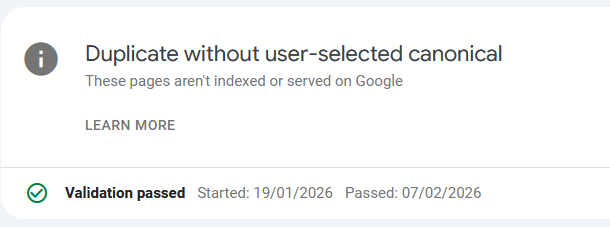
Still nothing changed regarding the indexing.

Update end.

If you do a search in Google specifically for this blog, it will show up empty. Zero posts found, zero content shown. In the last weeks less and less content was shown until we reached point zero on December 28th, 2025.
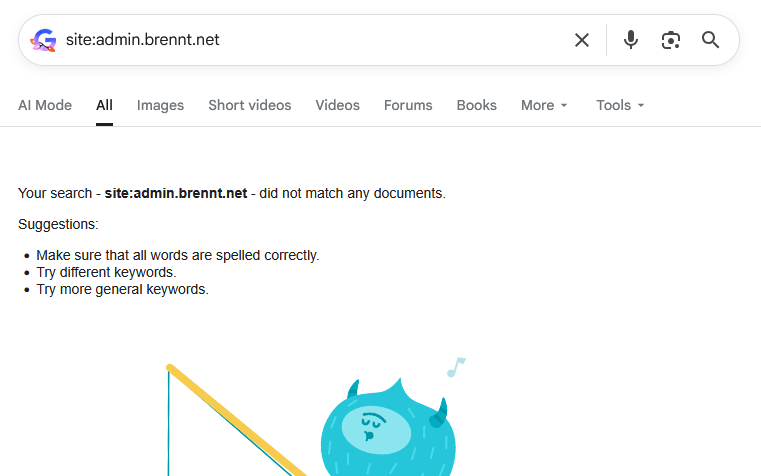
And I have absolutely no clue about the reason. Only vague assumptions.

I do remember my site being definitely indexed and several results being shown. This was how I spotted lingering DNS entries from other peoples long-gone web projects still pointing to the IP of my server. Which I blogged about in "It's always DNS." in November 2024.

This lead me to implement a HTTP-Rewrite rule to redirect the requests for those domains to a simple txt-file asking the people in a nice way to remove those old DNS entries. This can still be found here: https://admin.brennt.net/please-delete.txt

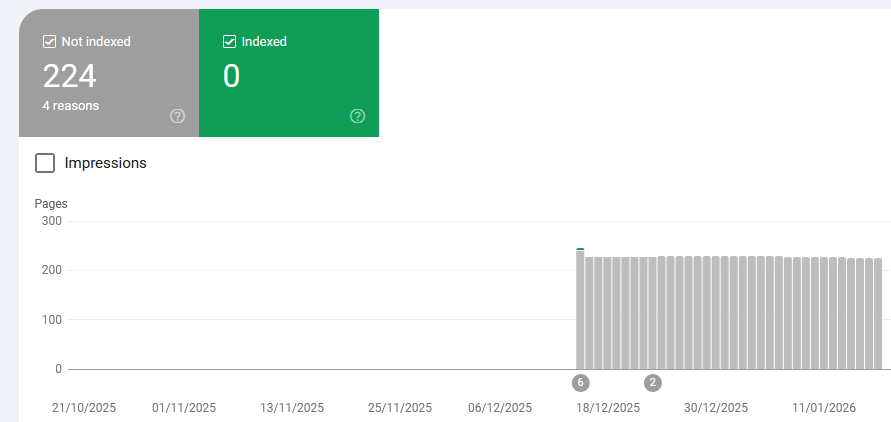
However since December 19th 2025 no pages are indexed anymore.
HTTP-302, the first mistake?

And maybe here I made the first mistake which perhaps contributed to this whole situation. As according to the Apache documentation on the Redirect flag HTTP-302 "Found" is used as the default status code to be used. Not the HTTP-301 "Moved permanently" status code. Hence I signaled Google "Hey, the content only moved temporarily".

And this Apache configuration DOES send a HTTP-302:

# Rewrite for old, orphaned DNS records from other people..
RewriteEngine On
<If "%{HTTP_HOST} == 'berufungimzentrum.at'">
    RewriteRule "^(.*)$" "https://admin.brennt.net/please-delete.txt"
</If>

Anyone having some knowledge in SEO/SEM will tell you to avoid HTTP-302 in order to not be punished for "duplicate content". And yeah, I did know this too, once. Sometime, years ago. But I didn't care too much and had forgotten about this.

And my strategy to rewrite all URLs for the old, orphaned domains to this txt-file lead to a situation where the old domains were still seen as valid and the content indexed through them (my blog!) as valid content.

Then suddenly my domain appeared too, but the old domains were still working and all requests temporarily redirected to some other domain (admin.brennt.net - my blog..). Hence I assume that currently my domain is flagged for duplicate content or being some kind of "link-farm" and therefore not indexed.

And I have no clue if this situation will resolve itself automatically or when.

A slow but steady decline

Back to the beginning. Around mid of October 2025 I grew curious how my blog shows up in various search engines. And I was somewhat surprised. Only around 20 entries where shown for my blog. Why? I had no clue. While I could understand that the few posts, which garnered some interest and were shared on various platforms, were listed first, this didn't explain why only so few pages were shown.

I started digging.

The world of search engines - or: Who maintains an index of their own

The real treasure trove which defines what a search engine can show you in the results is its index. Only if a site is included in its index it is known to the search engine. Everything else is treated like it doesn't exist.

However not every search engine maintains its own index. https://seirdy.one/posts/2021/03/10/search-engines-with-own-indexes/ has a good list of search engines and if they are really autonomous in maintaining their own index or not. Based on this I did a few tests with search engines for this blog. I solely used the following search parameter: site:admin.brennt.net

Search Engine Result
Google No results
Bing Results found
DuckDuckGo Results found
Ecosia Results found if using Bing, no results with Google
Brave Results found
Yandex Results found

Every single search engine other than Google properly indexes my blog. Some have recent posts some are lagging behind a few weeks. This however is fine and solely depends on the crawler and index update cycles of the search engine operator.

My webserver logs also prove this to be true. Zero visitors with a referrer from Google, but a small and steady number from Bing, DuckDuckGo and others.

So why does only Google have problem with my site?

Can we get insights with the Google Search Console?

I went to the Google Search Console and verified admin.brennt.net as my domain. Now I was able to have a deep dive into what Google reported about my blog.

robots.txt

My first assumption was that the robots.txt was somehow awry but given how basic my robots.txt is I was dumbfounded on where it was wrong. "Maybe I missed some crucial technical development?" was the best guess I had. No, a quick search revealed that nothing has changed regarding the robots.txt and Google says my robots.txt is fine.
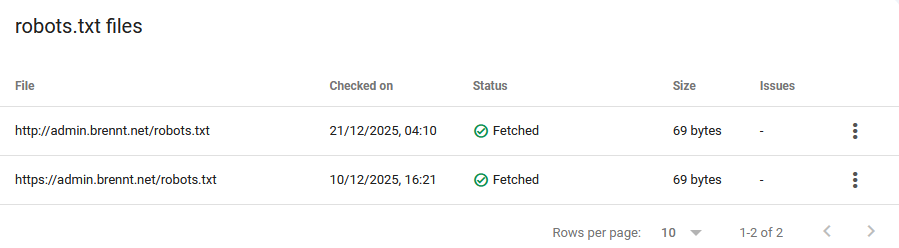
Just for the record, this is my robots.txt. As plain, boring and simple as it can be.

User-agent: *
Allow: /
Sitemap: https://admin.brennt.net/sitemap.xml

Inside the VirtualHost for my blog I use the following Rewrite to allow HTTP and HTTPS-Requests for the robots.txt to succeed. As normally all HTTP-Requests are redirected to HTTPS. The Search Console however complained about being an error present with the HTTP robots.txt..

RewriteEngine On
# Do not rewrite HTTP-Requests to robots.txt
<If "%{HTTP_HOST} == 'admin.brennt.net' && %{REQUEST_URI} != '/robots.txt'">
    RewriteRule "(.*)"      "https://%{HTTP_HOST}%{REQUEST_URI}" [R=301] [L]
</If>

But this is just house keeping. As that technical situation was already present when my blog was properly indexed. If at all, this should lead to my blog being ranked or indexed better, and not vanish..

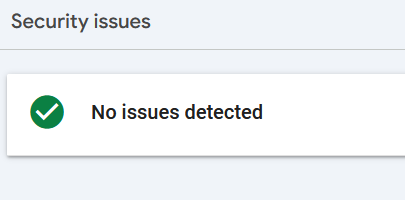
Are security or other issues the problem?

The search console has the "Security & Manual Actions" menu. Under it are these two mentioned reports about Security issues and issues requiring manual interaction.

Again, no. Everything is fine.
Is my sitemap or RSS-Feed to blame?

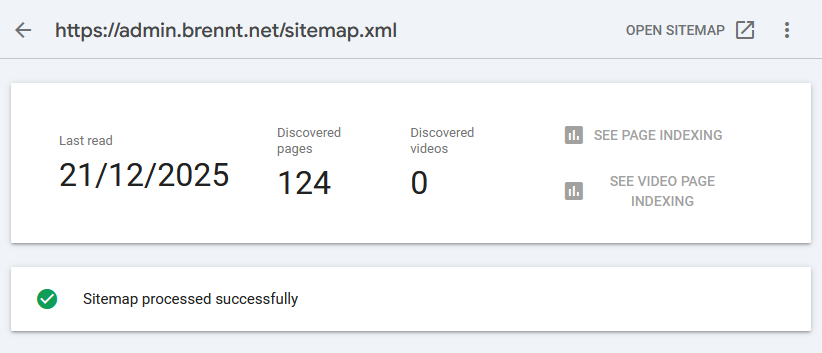
I read some people who claim that Google accidentally read their RSS-Feed as Sitemap. And that excluding a link to their RSS-Feed in the sitemap.xml did the trick. While a good point, my RSS-Feed https://admin.brennt.net/rss.xml isn't listed in my sitemap. Uploading the Sitemap in the Search Console also showed no problems. Not in December 2025 and not in January 2026.
It even successfully picked up the newly creating articles.
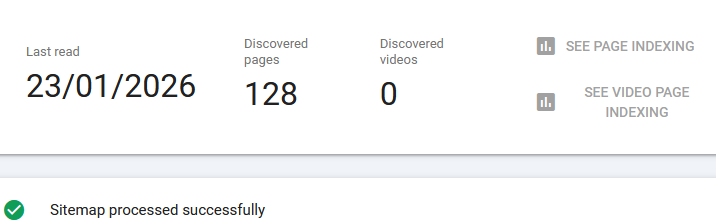
However even that doesn't guarantee that Google will index your site. It's just one minor technical detail checked for validity.

"Crawled - currently not indexed" the bane of Google

Even the "Why pages aren't indexed" report didn't provide much insight. Yes, some links deliver a 404. Perfectly fine, I deleted some tags, hence those links now end in a 404. And the admin login page is marked with noindex. Also as it should be.

The "Duplicate without user-selected canoncial" took me a while to understand, but it boils down to this: Bludit has categories and tags. If you click on such a category-/tag-link you will be redirected to an automatically generated page showing all posts in that category/with that tag. However, the Bludit canonical-plugin currently doesn't generate these links for category or tag views. Hence I fixed it myself.

Depending on how I label my content some of these automatically generated pages can look the same i.e. a page for category A can show the exact same posts as the page for tag B. What a user then has to do is define a canonical link in the HTML source code to make it possible to properly distinguish these sites and tell Google that, yes, the same content is available under different URLs and this is fine (this is especially a problem with bigger sites being online for many years).
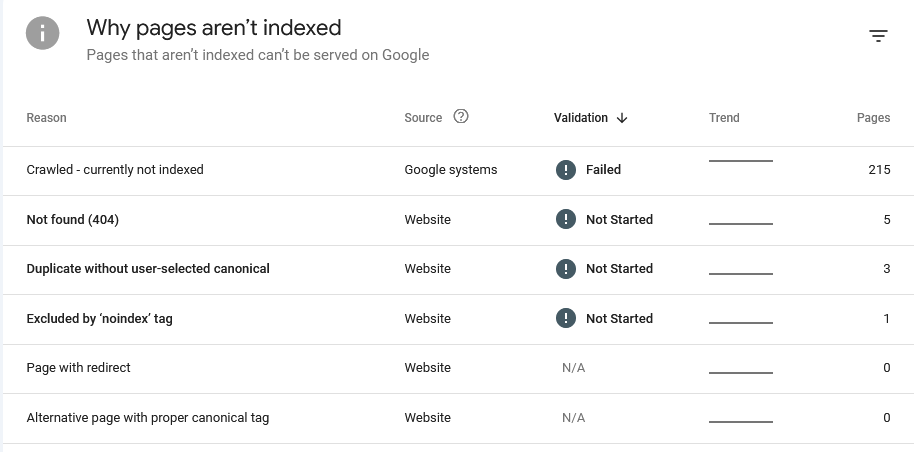
But none of these properly explain why my site isn't indexed anymore. As most importantly: All these issues were already present when my blog was indexed. Google explains the various reasons on its "Page indexing report" help page.

There we learn that "Crawled - currently not indexed" means:

The page was crawled by Google but not indexed. It may or may not be indexed in the future; no need to resubmit this URL for crawling.
Source: https://support.google.com/webmasters/answer/7440203#crawled

And that was the moment I hit a wall. Google is crawling my blog. Nothing technical prevents Google from doing so. The overall structure is fine, no security issues or other issues (like phishing or other fraudulent activities) are done under this domain.

So why isn't Google showing my blog!? Especially since all other search engines don't seem to have an issue with my site.

Requesting validation

It also didn't help that Google itself had technical issues which prevented the page indexing report from being up-to-date. Instead I had to work with old data at that time.

I submitted my Sitemap and hoped that this will fix the issue. Alas it didn't. While the sitemap was retrieved and processed near instantly and showed a Success-Status along with the info that it discovered 124 pages... None of them were added.

I requested a re-validation and the search console told me it can take a while (they stated around 2 weeks, but mine took more like 3-4 weeks).

Fast-forward to January 17th 2026 and the result was in: "Validation failed"
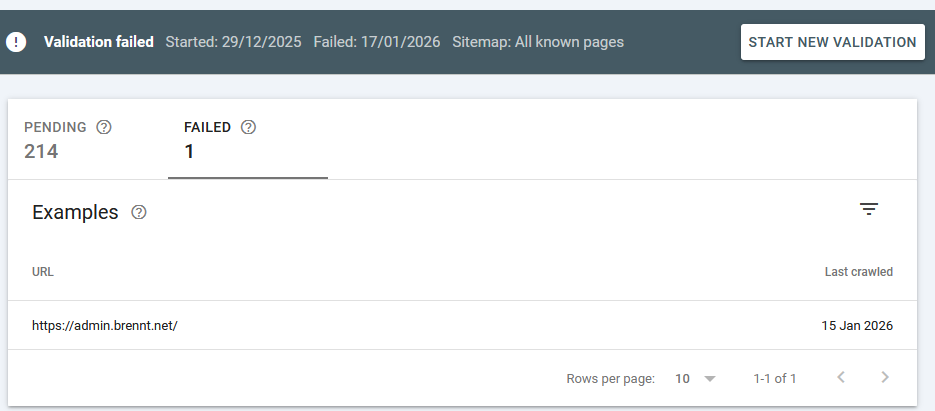
What this means is explained here: https://support.google.com/webmasters/answer/7440203#validation

The reason is not really explained, but I took with me the following sentence:

You should prioritize fixing issues that are in validation state "failed" or "not started" and source "Website".

So I went to fix the "Duplicate without user-selected canonical" problem, as all others (404, noindex) are either no problems or are there intentionally. This shouldn't be a problem however, as Google itself writes the following regarding validation:

It might not always make sense to fix and validate a specific issue on your website: for example, URLs blocked by robots.txt are probably intentionally blocked. Use your judgment when deciding whether to address a given issue.

With that being fixed, I requested another validation in mid-January 2026. And now I have to wait another 2-8 weeks. *sigh*

A sudden realization

And then it hit me. I vaguely remember that Google scores pages based on links from other sites. Following the mantra: "If it's good quality content, people will link to it naturally." My blog isn't big. I don't have that many backlinks. And I don't to SEO/SEM.

But my blog was available under at least one domain which had a bit of backlink traffic - traffic I can still see in my webserver logs today!

Remember how my blog's content was first also reachable under this domain? Yep. My content was indexed under this domain. Then I changed the webserver config so that this isn't the case anymore. Now I send a proper HTTP-410 "Gone". With that... Did I nuke all the (borrowed) reputation my blog did possess?

If that should be the case (I have yet to dig into this topic..) the question will likely be: How does Google treat a site which backlinks vanished, or more technical, how to properly move content from one domain to another. And is there anything I can do afterwards to fix this, if I did it wrong.

Anything else?

If you are familiar with the topic and have an idea what I can check, feel free to comment. As currently I'm at my wits end.

Comments

Adding canonical links for category and tag pages in Bludit 3.16.2

TL;DR: I updated to Bludit 3.17.2 and this change isn't needed anymore as the Canonical plugin was rewritten and now includes canonical links for tag and category pages.

Google's Search Console has problems with my site regarding duplicate content due to "Duplicate without user-selected canonical". Which is Google's wording for:

The automatically generated site-views for your categories and tags have the same content sometimes. Hence identical content is available under different URLs.

And yes, when I checked the HTML source of these pages there is no canonical link. Despite the canonical-plugin being active.

A single post shows the following:

<!-- Load Bludit Plugins: Site head -->
<link rel="canonical" href="https://admin.brennt.net/please-don-t-remove-your-comment-section">
<link href="/bl-plugins/prism/css/prism.css" rel="stylesheet">

But for https://admin.brennt.net/tag/2fa or https://admin.brennt.net/category/it it only showed the following:

<!-- Load Bludit Plugins: Site head -->
<link href="/bl-plugins/prism/css/prism.css" rel="stylesheet">

ChatGPT to the rescue! - But with a twist!

As it is currently 6am I wasn't in the mood to dig through the code myself. So I asked ChatGPT: "How do I retrieve the tag name element in the Bludit blogging software". Only for ChatGPT to give me an extensive answer. ... For PHP-Code the canonical-plugin didn't have.

Ah.. Yes.. Typical, isn't it? Stupid LLMs, bla bla.

No, turns out on January 15th the canonical-plugins was extensively re-written. Fixing the missing canonical links. Great. So ChatGPT did indeed based it answer on the current code. I quickly searched the Bludit forum and GitHub if there is anything said about a new Bludit release but nothing showed up. And as the last release was in August 2024 I currently don't have high hopes for a release in the near future.

Instead I just copy & pasted the current code completely into ChatGPT - as providing the GitHub link didn't work - and got an answer that looked good.

<?php

class pluginCanonical extends Plugin {

	public function siteHead()
	{
		// Home page
		if ($GLOBALS['WHERE_AM_I'] === 'home') {
			return '<link rel="canonical" href="'.DOMAIN_BASE.'"/>'.PHP_EOL;
		}

		// Single page / post
		elseif ($GLOBALS['WHERE_AM_I'] === 'page') {
			global $page;
			return '<link rel="canonical" href="'.$page->permalink().'"/>'.PHP_EOL;
		}

		// Tag pages
		elseif ($GLOBALS['WHERE_AM_I'] === 'tag') {
			global $url;
			$tagKey = $url->slug();
			return '<link rel="canonical" href="'.DOMAIN_TAGS.$tagKey.'"/>'.PHP_EOL;
		}

		// Category pages
		elseif ($GLOBALS['WHERE_AM_I'] === 'category') {
			global $url;
			$categoryKey = $url->slug();
			return '<link rel="canonical" href="'.DOMAIN_CATEGORIES.$categoryKey.'"/>'.PHP_EOL;
		}
	}

}

The only new lines are the ones for tag pages and category pages.

Editing the bl-plugins/canonical/plugin.php file, reloading a category and a tag page, aaaaaaand we're green on canonical links.

Result for https://admin.brennt.net/tag/2fa:

<!-- Load Bludit Plugins: Site head -->
<link rel="canonical" href="https://admin.brennt.net/tag/2fa"/>
<link href="/bl-plugins/prism/css/prism.css" rel="stylesheet">

Result for https://admin.brennt.net/category/it:

<!-- Load Bludit Plugins: Site head -->
<link rel="canonical" href="https://admin.brennt.net/category/it"/>
<link href="/bl-plugins/prism/css/prism.css" rel="stylesheet">

Great. Now back to the main problem...

Comments

Goodbye, Bludit? Hello, Kirby?

For a few months now, I've been regularly coming back to this point where I ask myself whether I want to continue using Bludit. The latest version dates from August 2024, and there are issues with IT security-related bugs open and unresolved on GitHub.

Sure, Bludit is open source. Anyone can fork it. But Jürgen Greuter (alias: Tante) wrote back in 2013: "Host your own is cynical". In this text, he discusses why not everyone can set up and operate software "just like that" when a service is discontinued or its business model changes fundamentally.

And in this sense, I would like to note: "Fork your own is cynical"

I want to blog. I want to write down and publish my thoughts. I don't want to programme PHP or deal with problems in dozens of different browser versions. In some cases, I would also have to acquire a lot of knowledge (again) first. And the time spent for maintaining the fork? No, thank you.

I just want to be a user. Period.

And well, as can be read in the Bludit forum, the only developer (Diego) is not working on Bludit until further notice. There are apparently only minimal adjustments. Too bad. Also because security-related bugs are obviously not included.

But just as I simply want to be a user, I can understand that Diego also has a life and needs to pay his bills.

So I did a little research and came across the blogging software Kirby. Also a FlatFile CMS. You do have to buy a licence for Kirby, but at 99€ for three years, it's more than fair. And the source code is available on GitHub. So if I want to, I can dig through the code myself and see what's going on or whether there's already an issue for my problem.

What's more, the software has been on the market for over 10 years and is used by several well-known magazines and projects (e.g. OBS and Katapult Magazine). That also speaks for its reliability.

Well, I think I'll spend a weekend or so with the trial version and see how Kirby feels. The demo was nice, anyway, and didn't leave me wanting anything.

Comments

Quo vadis Bludit? And a new blog theme

I switched to a new blog theme. While Solen was great, I didn't like the mandatory article images. It just makes no sense to search for the 20th "Code lines displayed in some kind of terminal or IDE" image for a blogpost. Also the overall look & feel was a bit too much "early 2000s". I wanted something that looked a bit more refined. More clean.

Browsing through https://themes.bludit.com/ I found the Keep It Simple-Theme. Only that it was last modified in 2020 for a 2.x Bludit version, while we are now at 3.16.2. 

Luckily only a few modifications were needed and I finally took the time to create a separate Git-Repository for my theme modifications. Have a look at if you want to use it too: https://github.com/ChrLau/keep-it-simple

Although it contains some CSS changes, but I kept the original CSS in via comments so it should be rather easy to switch back. The changes mostly affect colours, blockquotes, fonts. Not the general layout, hence incorporating updates from the original StyleShout template should be easy.

Some minor tweaks are still coming, as I still have to check mobile & widescreen support and I want a different font used in blockquotes. The current one merriweather-italic doesn't look good as the vertical alignment is too uneven for my liking. Especially the letter "e" is too high and gives every word with an "e" a somewhat strange look.

But in general I am happy with the current look & feel.

I mean, the W3 Validator still isn't completely happy, but there are some things I can't fix directly and the only option I have is to open a pull request: Bludit: Fix canoncial links in siteHead plugin. Sadly alt-tags for images are also not possible and the corresponding Issue in the Bludit repository is closed since 2022 as "this will be fixed with Bludit 4.x". Meanwhile we are still at Bludit 3.x, a 4.x branch doesn't even exist and development really slowed down and there isn't much activity from the only developer. I seriously hope these are not bad omens..

Also no activity on my Cookie security issue Enhance cookie security by setting samesite attribute and adding __Secure- prefix to sessionname (Bludit issue 1582) and at least one unpatched Stored XSS does exist: Bludit - Stored XSS Vulnerability (Bludit issue 1579).

Let's just hope the best for now...

Comments