Using PowerShell to get the size of folders (Get-FolderSize function)
On my gaming PC Windows complained that C:\ had only 10GB of free space left. Time to free up some space! In WindowsXP times I used a separate Program called GetFolderSize for this, but nowadays with PowerShell I was like: "Hey, I bet I can do this with PowerShell alone."
After a bit of back & forth I came up with the following function:
function Get-FolderSize {
    param([string]$Path = ".")
    Get-ChildItem $Path -Directory -Force | ForEach-Object {
        $bytes = (Get-ChildItem $_.FullName -Recurse -File -Force -ErrorAction SilentlyContinue |
                  Measure-Object Length -Sum).Sum
        [PSCustomObject]@{ Folder = $_.Name; Bytes = [long]$bytes }
    } | Sort-Object Bytes -Descending |
      Format-Table Folder,
        @{n='Size(MB)';e={'{0:N2}' -f ($_.Bytes/1MB)}},
        @{n='Size(GB)';e={'{0:N2}' -f ($_.Bytes/1GB)}} -AutoSize
}
It worked fine. However I always needed to copy & paste it into the current PowerShell window to have the function available. Hence I had a new question: How do I make this function available for my local Windows? How do I add this function to the PowerShell equivalent of a .bashrc?
I myself was surprised I didn't know how to do this. Never needed it before apparently. And at customers PowerShell and/or UserProfiles are always locked down so that I can't do such stuff.
Making a PowerShell function constantly available
Microsoft has some documentation available about the $PROFILE variable: https://learn.microsoft.com/en-us/powershell/module/microsoft.powershell.core/about/about_profiles?view=powershell-7.6
First I tested if I already have a $PROFILE for the current user on the current host. This turned out to be false:
PS C:\Users\USER> Test-Path $PROFILE
False
Hence I simply create the $PROFILE:
PS C:\Users\USER> New-Item -ItemType File -Path $PROFILE -Force


    Verzeichnis: C:\Users\USER\Documents\WindowsPowerShell


Mode        LastWriteTime         Length  Name
----        -------------         ------  ----
-a----      8/8/2026   4:44 PM         0  Microsoft.PowerShell_profile.ps1
Now I can edit my $PROFILE and the Get-FolderSize function:
PS C:\Users\USER> notepad $PROFILEThen just copy&paste the function in the Microsoft.PowerShell_profile.ps1 file:
(Note the screenshot shows an older version of the code.)
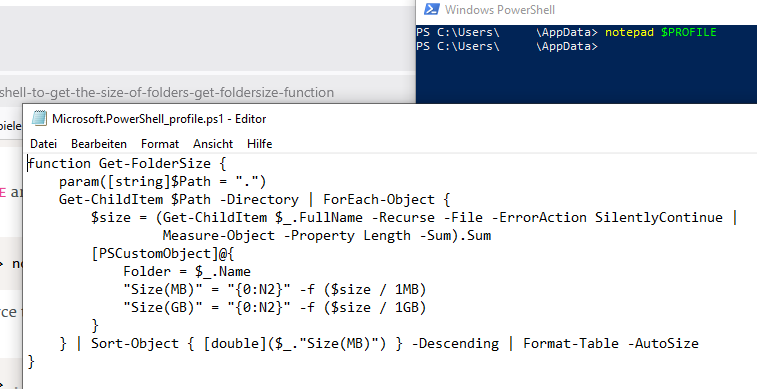
After that we need to source the $PROFILE again to have it available. Just like on Linux:
PS C:\Users\USER> . $PROFILEAnd it works just fine:
PS C:\Users\USER\AppData> Get-FolderSize .

Folder   Size(MB)  Size(GB)
------   --------  --------
Local    53,609.24 52.35
Roaming  10,956.81 10.70
LocalLow 9,207.82  8.99
Alternatives
PowerShell Gallery
Only later did I learn of the site https://www.powershellgallery.com/, they collect scripts from the community and make them available. There seems to be a good script here, however I didn't use it.
Microsoft SysInternal DiskUsage Utility
There is a du tool from SysInternals available here: https://learn.microsoft.com/en-us/sysinternals/downloads/du. Downloading that and putting the binary in the $PATH should do the trick to. However I did not check if the output matches my desired format.